Showing posts with label Colasoft Network Sniffer. Show all posts

Thursday, May 14, 2009

How Can I Detect a Network Sniffer?

colasoft network analyzerThe article "How can I detect a network sniffer" is extracted by Jason Lee from www.Colasoft.com for knowledge sharing. For complete copy on this topic, please visit Sniffing (network wiretap, sniffer) FAQ.

In theory, it is impossible to detect packet sniffing programs because they are passive: they only collect packets, they don't transmit anything. However, in practice it is sometimes possible to detect sniffing programs. It is similar to how in theory it is impossible to detect radio/TV receivers, but European countries do it all the time in order to catch people avoiding the radio/TV tax.


A stand-alone network sniffer doesn't transmit any packets, but when installed non-standalone on a normal computer, the sniffing program will often generate traffic. For example, it might send out DNS reverse lookups in order to find names associated with IP addresses.


Non-standalone network sniffers are indeed what you want to detect. When crackers/hackers invade machines, they often install sniffing programs. You want to be able to detect this happening.

General Overview of Detection Method

Ping method


Most "network sniffers" run on normal machines with a normal TCP/IP stack. This means that if you send a request to these machines, they will respond. The trick is to send a request to IP address of the machine, but not to its Ethernet adapter.

To illustrate:


  1. The machine suspected of running the network sniffer has an IP address 10.0.0.1, and an Ethernet address of 00-40-05-A4-79-32.

  2. You are on the same Ethernet segment as the suspect (remember, the Ethernet is used only to communicate locally on a segment, not remotely across the Internet).

  3. You change the MAC address slightly, such as 00-40-05-A4-79-33.

  4. You transmit an "ICMP Echo Request" (ping) with the IP address and this new MAC address.

  5. Remember that NOBODY should see this packet, because as the frame goes down the wire, each Ethernet adapter matches the MAC address with their own MAC address. If none matches, then they ignore the frame.

  6. If you see the response, then the suspect wasn't running this "MAC address filter" on the card, and is hence sniffing on the wire.


There are ways defending against this. Now that this technique is widely publicized, newer hackers will enabled a virtual MAC address filter in their code. Many machines (notably Windows) have MAC filtering in drivers. (There is a hack for Windows: most drivers just check the first byte, so a MAC address of FF-00-00-00-00-00 looks like FF-FF-FF-FF-FF-FF (the broadcast address which all adapters accept). However, some adapters implement multicast in such as way that this address will match as a multicast, which is any address whose first byte is an odd number. Thus, this can result in false positives).

This technique will usually work on switched/bridged Ethernets. When switches see an unknown MAC address for the first time, they will "flood" the frame to all segments.

Ping method, part 2

The ping method can be enhanced in a number of ways:


  1. Any protocol that generates a response can be used, such as a TCP connection request or a UDP protocol such as port 7 (echo).

  2. Any protocol that might generate an error on the target machine might be used. For example, bad IP header values might be used to generate an ICMP error.

  3. Sometimes a broadcast address (either a "local broadcast" like 255.255.255.255 or a "directed broadcast" like 10.0.0.255) needs to be used in order to bypass software IP address filtering. This then encounters another problem in that many machines do not respond to broadcast requests (responses to broadcasts causes network problems, such as the 'smurf' hack).


ARP method


The ARP method is similar to the ping method, but an ARP packet is used instead. An explanation (in Spanish) is given at http://www.apostols.org/projectz/neped/ which includes a program called neped to do this detection.

The simplest ARP method transmits an ARP to a non-broadcast address. If a machine responds to such an ARP of its IP address, then it must be in promiscuous mode.

A variation of this technique takes advantage of the fact that machines "cache" ARPs. Each ARP contains the complete information of both the sender as well as the desired target information. In other words, when I send out a single ARP to the broadcast address, I include my own IP-to-Ethernet address mapping. Everyone else on the wire remembers this information for the next few minutes. Therefore, you could do something like sending out a non-broadcast ARP, then a broadcast ping. Anybody who responds to your ping without ARPing you could only have gotten the MAC address from a sniffed ARP frame. (To make double-sure, use a different source MAC address in the ping).


DNS method


Many sniffing programs do automatic reverse-DNS lookups on the IP addresses they see. Therefore, a promiscuous mode can be detected by watching for the DNS traffic that it generates.

This method can detect dual-homed machines and can work remotely. You need to monitor incoming inverse-DNS lookups on the DNS server in your organization. Simply do a ping sweep throughout the company against machines that are known not to exist. Anybody doing reverse DNS lookups on those addresses are attempting to lookup the IP addresses seen in ARP packets, which only sniffing programs do.

This same technique works locally. Configure the detector in promiscuous mode itself, then send out IP datagrams to bad addresses and watch for the DNS lookups.

One interesting issue with this technique is that hacker-based sniffing programs tend to resolve IP addresses as soon as they are found, whereas commercial programs tend to delay resolution until the point where the network sniffer user views the protocol decodes.


Source-route method


Another technique involves configuring the source-route information inside the IP header. This can be used to detect network sniffers on other, nearby segments.


  1. Create a ping packet, but put a loose-source route to force it by another machine on the same segment. This machine should have routing disabled, so that it will not in fact forward it to the target.

  2. If you get a response, then it is likely the target sniffed the packet off the wire.

  3. In the response, doublecheck the TTL field to find out if it' came back due to sniffing (rather than being routed correctly)


Details:

In loose source-routing, an option is added to the IP header. Routers will ignore the destination IP address and instead forward to the next IP address in the source-route option. This means when you send the packet, you can say "please send packet to Bob, but route it through Anne first".

In this scenario, both "Anne" and "Bob" are on the segment. Anne does not route, and therefore will drop the packet when received. Therefore, "Bob" will only respond if he has sniffed the packet from the wire.

On the off chance that Anne does indeed route (in which case Bob will respond), then the TTL field can be used to verify that Bob responded from routing through Anne, or answering directly.


The decoy method


Whereas the ping and ARP methods only work on the local network, the decoy method works everywhere.

Since so many protocols allow "plain text" passwords, and hackers run sifters looking for those passwords, the decoy method simply satisfies that need. It consists simply of setting up a client and a serve on either side of the network, which the client runs a script to logon to the server using Telnet, POP, IMAP, or some other plain-text protocol. The server is configured with special accounts that have no real rights, or the server is completely virtual (in which case, the accounts don't really exist).

Once a hacker sifts the usernames/passwords from the wire, he/she will then attempt to log on using this information. Standard intrusion detection systems or audit trails can be configured to log this occurance, alerting the fact that a sniffing hacker has found the traffic and attempted to use the information.

http://www.zurich.ibm.com/~dac/Prog_RAID98/Full_Papers/sniffer_detector.html/index.htm


Host method


When hackers break into your systems, they will often leave behind wiretap programs running in the background in order to sniff passwords and user accounts off the wire. These are often imbedded (as a trojan) in other programs, so the only way to find if something like this is running is to query the interfaces to see if they are running in promiscuous mode.

The most technique is to run the program "ifconfig -a". On my computer (Solaris 2.6) the output looks like:

# ifconfig -a

lo0: flags=849<UP,LOOPBACK,RUNNING,MULTICAST> mtu 8232

inet 127.0.0.1 netmask ff000000

hme0: flags=863<UP,BROADCAST,NOTRAILERS,RUNNING,PROMISC,MULTICAST> mtu 1500

inet 192.0.2.99 netmask ffffff00 broadcast 192.0.2.255

ether 8:0:20:9c:a2:98


Of course, the first thing a hacker will do is replace the 'ifconfig' program to hide this. There are other utilities you can download from the net that will query the hardware directly in order to discover this information, or you could run the 'ifconfig' program directly from a CD-ROM distribution.


Latency method


This is a more evil method. On one hand, it can significantly degrade network performance. On the other hand, it can 'blind' network sniffers by sending too much traffic.

This method functions by sending huge quantities of network traffic on the wire. This has no effect on non-promiscuous machines, but has a huge effect on sniffing machines, especially those parsing application layer protocols for passwords. Simply ping the machine before the load and during the load and testing the difference in response time can indicate if the machine is under load.

One problem with this technique is that packets can be delayed simply because of the load on the wire, which may case timeouts and therefore false positives. On the other hand, many sniffing programs are "user mode" whereas pings are responded to in "kernel mode", and are therefore independent of CPU load on a machine, thereby causing false negatives.


TDR (Time-Domain Reflectometers)


A TDR is basically RADAR for the wire. It sends a pulse down the wire, then graphs the reflections that come back. An expert can look at the graph of the response and figure out if any devices are attached to the wire that shouldn't be. They also roughly tell where, in terms of distance along the wire, the tap is located.

This can detect hardware network sniffers that might be attached to the wire, but which are completely silent otherwise.

TDRs used to be used a lot in the old days of coax Ethernet in order to detect vampire taps, but these days with star topologies, they are used very rarely.

There also exist OTDR equipment, but this is really only for the truely paranoid.


Hub lights


You can manually check hub-lights to see if there are any connections you don't expect. It helps to have labeled cables to figure out where (physically) a network sniffer might be located.


SNMP monitoring


Smart hubs with SNMP management can provide automated monitroning of Ethernet (and other) hubs. Some management consoles will even let you log connections/disconnections to all your ports. If you've configured the system with the information where all the cables terminate, you can sometimes track down where a network sniffer might be hiding.

Sunday, April 19, 2009

Top 5 Items Our IT Department Must Do

Even though it is a basic economic fact that recessions happen once or twice in a decade, when the economy is in a good shape, like it was a couple of years ago, people, including IT managers, tend to forget that the summer will be over and hard times will come soon. On the other hand, recessions might be bad but the current one is certainly worse than many of the ones before. Actually, this is the worst recession since the Great Depression in the 1930s and even the most optimistically-minded managers have really serious reasons to fear and be cautious.

We can't say that the recession took us by surprise but certainly we didn't expect it to be that fierce. However, recession or no recession, life must go on and if a company wants to make it, there are many things which can't be skipped. So, no matter that IT budgets are tight, there are items a company can't save on. Here are the top 5 items our IT department will not sacrifice:

1, Network security and security in general. Being in the network security business themselves, we know that network security and security in general is paramount and no matter how hard the economic situation might be, this is not an item to save on because the price is too high. Certainly, we are not buying the most expensive solutions, even though they are incredibly great but we also do not make compromises with the quality either.

2, Going green. Going green is also an item we can't skip. Green technology saves money and now this benefit is more important than ever. So, if we buy new IT stuff, we definitely go for the green items.

3, Compliance. Regulations compliance is another item we can't afford to skip, unless we really want to go out of business (and we don't). So, when there are steps in this direction to be taken, we do them – no way!

4, Training. Training is also important and even though our training budget has shrunk, we still try to keep our staff qualified.

5, Outsourcing. Outsourcing has been a successful strategy for our company at all times and now, when money issues start to surface, we are happy that outsourcing helps us cut cost with no sacrifice of quality.


Kevin Chou is Author of this article from www.Colasoft.com.

About Colasoft Co., Ltd.
Ever since 2001, Colasoft has been dedicated in providing all-in-one and easy-to-use network sniffer software for network administrators and IT managers to monitor network activities, analyze network performance, enhance network security, and troubleshoot network problems. Up to now, more than 5000 customers in over 70 countries trust the flagship product – Colasoft
network sniffer as their network monitoring and troubleshooting solution. Colasoft also offers four free network utilities: Colasoft Packet Builder, Colasoft Packet Player, Colasoft MAC Scanner, and Colasoft Ping Tool. Learn more about Colasoft and its solutions, please visit http://www.colasoft.com/.


Thursday, April 16, 2009

How to Protect Your Network with Network Sniffer

A network sniffer (also called a network analyzer) can help you make your network more secure by identifying what's going on in it

Networks are large entities, even if they don't consist of thousands of machines. Large networks are especially vulnerable because they are a fruitful ground for attacks and hacking of all kinds. Even if a system administrator is a genius, he or she can't fight network security threats with bare hands.

Why Do You Need to Protect Your Network?

One of the major principles in network security is that a network is as secure as its weakest part is. In other words, it makes no sense to invest tons of money and spend many hours to secure some of the parts of a network, when there are small vulnerabilities that can be easily abused.

With networks small vulnerabilities are very common and even though one can never be sure that his or her network is secure, when no efforts in that direction are made, it is as sure as hell that this network is at risk. That is why it is absolutely clear that nobody can afford to leave a network unprotected. Fortunately, there are many tools, which help to protect a network and network sniffers are one of them.

How a network Sniffer Can Protect Your Network?

Network sniffers (or network analyzers, as they are also called) can be one of the best tools you can use to protect your network. There are many types of network threats and there is no universal tool that can help you protect your network against all of them, so if you expect that a network sniffer can safeguard your network against all kinds of threats, this is not so but it is a fact that a network sniffer can help you against many threats, both internal and external.

colasoft network sniffer

A network sniffer captures all the packets which go to and from your network and shows you their contents. While a network sniffer is helpless against encrypted traffic, with unencrypted traffic a network sniffer is an indispensable tool. When you have the chance to know what's going on in your network, you can easily spot the activities, which shouldn't be taking place.

colasoft network sniffer

For instance, if somebody is downloading files with BitTorrent, or is generating any other kind of substantial traffic, a network sniffer, such as Colasoft Network Sniffer, will display this immediately and you will know that you should take the adequate measures to stop it. Actually, a network sniffer allows to monitor all incoming and outgoing traffic and keep logs of this, so even if you don't react immediately when suspicious traffic occurs, all the traffic is logged and you can view it later.

Depending on the features of the network sniffer you have selected, you will have different options to protect your network. Some of the network sniffers with a rich feature set, for instance Colasoft Network sniffer, offers a lot in terms of traffic monitoring. Generally, even the network sniffers with less features allow to monitor suspicious activity at least from a given host or protocol.

One of the cases when network sniffers don't offer much help is with encrypted traffic. This is a technical limitation and even though network sniffers can intercept encrypted packets, they can't break the encryption and show the actual content of the packet. However, when you are monitoring a network and you notice that there is unauthorized encrypted traffic (for instance from a given host), this should ring a bell that something not nice is probably going on and you should take the adequate measures to investigate what exactly is happening.

Wednesday, April 15, 2009

How to Sniff all Images of a Webpage

In case we want to sniff all images of a webpage, here is a detailed process how we can do it with Colasoft Packet Sniffer’s "Logs" feature. I will take the CNN.com home page as an example.

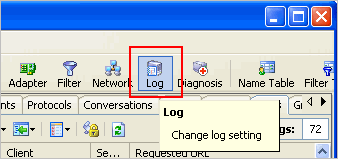
Step 1. Open Log Settings

Log settings allows us to set up some conditions or exceptions whether or not record some logs in the Logs tab. If we want to display just images in the Logs tab, we must enable the HTTP Log conditions.

How to Sniff Images Screenshot 1

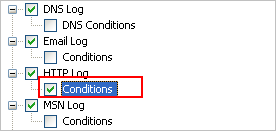
Step 2. Enable Http Log Conditions

We must tick before Conditions to enable it

How to Sniff Images Screenshot 2

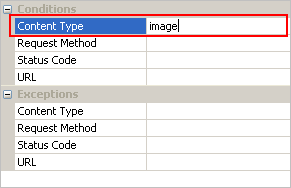
Step 3. Input "Image" into Content Type

On the right hand, lets’ input the content type in order to filter contents

How to Sniffer Images Screenshot 3

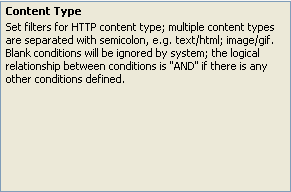
Here is an explanation of Content Type

How to Sniff Images Screeshot 4

Step 4. "OK" to Activate the Setting

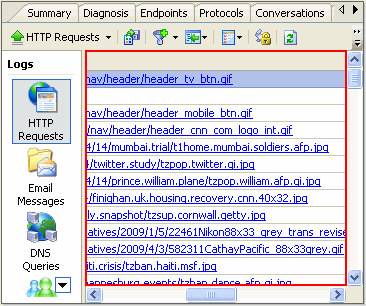
Now we’ve done with the Log Settings, let’s see whether we can sniff all images of CNN.com index page. First of all, let’s start capturing with Colasoft Packet Sniffer, then let’s input the URL into the address bar and start browsing.

Results start showing in the Logs Tab – Http Request Option, we can see all results are in image formats. We have successfully sniffed all the images on this webpage.

How to Sniff Images Screeshot 5

To view the image, we can click on the record, and it will be shown in a browser.

How to Sniff Images Screenshot 6


Sunday, April 12, 2009

Colasoft Network Sniffer Capsa 6.9 Review

Overview
Not so hard for a freshman.
Auto diagnosis.
Real time capture.
If it's cheaper, I will definitely buy it!
After using Colasoft Network Sniffer, I found 3 features of this product:

a.supports the real-time capturing and monitoring
b.excellent capability of protocol analyzing (approximately 300 types) and packet decoding
c.Well, the most exciting part is the automatic expert diagnosing! That really saves so much money and time for me,and I do not worry about the solution of failure again!

Cost and performance are in desired level .

What It Is and What It Can Do

Colasoft Network Sniffer is an expert Network Sniffer designed for packet decoding and network diagnosis; it monitors the network traffic transmitted over a local host and a local network, with the ability of real time packet capture and accurate data analysis. Colasoft Network Sniffer makes your network operations completely transparent before you, letting you isolate and troubleshoot network problems quickly and efficiently. The flexible and intuitive user interface lets either IT professionals or novice users skilfully handle it in a few moments.

Easily understand how to use this Network Sniffer with samples provided with the Tool. Sample packets helps me a lot for my first time deployment by avoiding contacting the Technical Support during my initial days of using this tool.

For a Small Business Enterprise, This tool’s network diagnosis helps me to detect slow network and upgraded speed for better utilization.

I prefer this for a Medium Business Enterprise as troubleshooting network issues is simply superb.

For Medium and a Large Business Enterprises, Security is an issue .This Network Sniffer enhances Network Security by monitoring the network with Logs. As every packet is recorded and analyzed, loopholes can easily detect.

For every organization, security is a major concern. By using this tool Monitoring of Email Contents and Monitoring IMs, Chats is easy. Every information in Messegers, chats, HTTP Requests is logged .

Can easily find where the problem from the Packet Analysis without letting the user to report about his huge traffic.

For Internet Service Provider, this is very very useful tool. ISPs have problems of Server down issues due to huge traffics. By diagnosing with this tool, Server down issues can be reduced.
Prevent hibernation while capturing and view both IP Addresses and Hostnames. This is a good feature in upgraded version.

Colasoft Network Sniffer Supports Windows Vista-64 bit Edition. Able to identify and Analyze 300+ Network Protocols.

By going through the site www.colasoft.com, I came to know thatColasoft Network Sniffer Professional Edition available and used it for Analyses. It really good to use and operate. Everything is logged and my network usage is monitored.

Videos in the website help me to understand the ARP Attacks, Monitoring Network traffic. So I can protect my network now by identifying the deceived hosts and by identifying who is consuming maximum bandwidth in a Local Segment.

I can monitor the traffic either by protocol, IP or MAC Address. So much flexibility in using this Network Sniffer.

Internet Service Providers can use this tool for quick issue troubleshooting. Easy to identify problems and minimizes the time to service the customer.

The reports are displayed with Graphs and Tables .Viewing the connection in a matrix is wonderful and it is something special in Colasoft Network Sniffer. This pictorial epresentation is really good to sort out the issue by easily detecting.

Colasoft Network Sniffer has the tools that would not find in other Network Sniffers, including ping and scan IPs and MACS across the LAN.

Summary
Colasoft Network Sniffer is an easy-to-use and all-in-one tool for IT Network Administrator, IT Consultant and for a Security Manager in IT Company.